Bulk export your Read AI transcripts — all of them, in one ZIP

Read AI makes you download meeting reports one at a time. NoteHaul exports your whole history — transcripts, summaries, action items, key questions — to Markdown, TXT, CSV or JSON in a few clicks.

Add to Chrome — coming soon See how it works Free for your first 5 meetings · no account needed
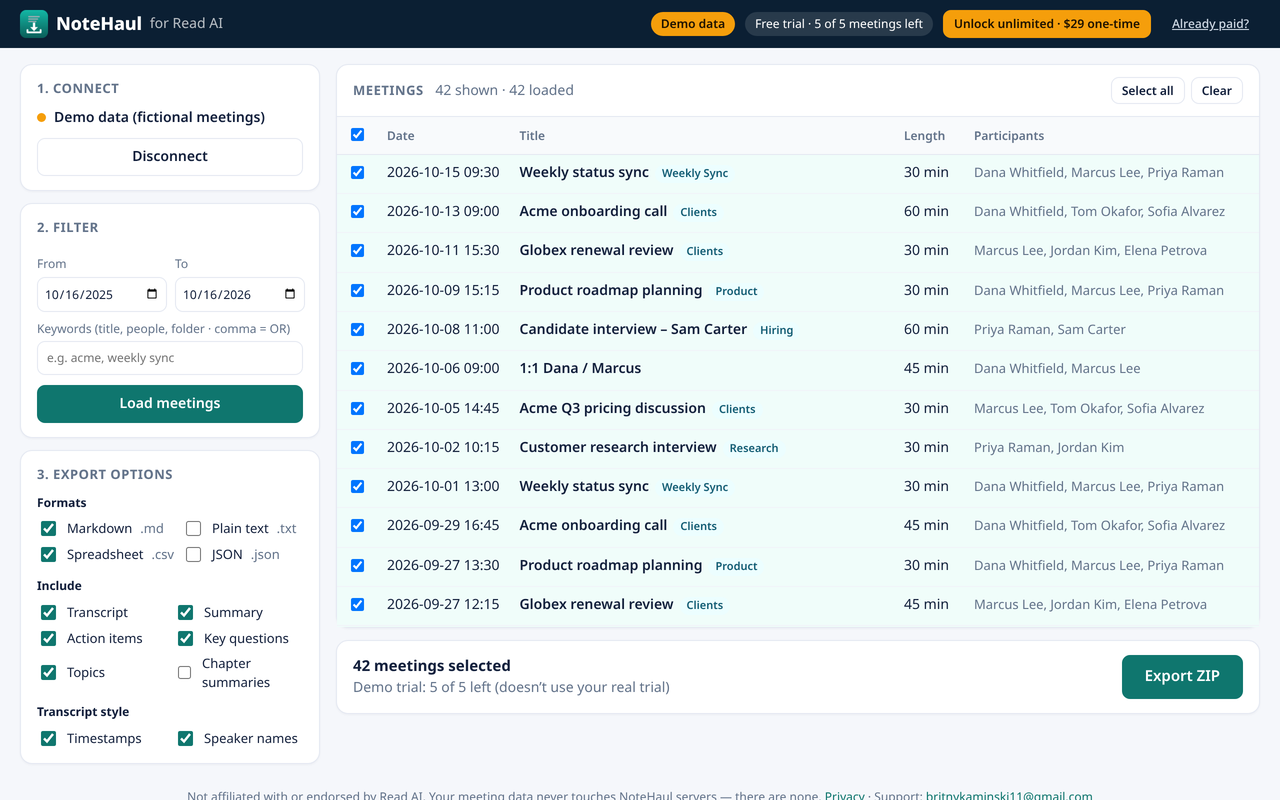
NoteHaul listing Read AI meetings with checkboxes, date and keyword filters, and an Export ZIP button

Why people need a Read AI bulk export

Your meeting history is valuable. Getting it out of Read AI in bulk is not built in.

OptionPast meetings?Effort
Read AI “Download” buttonYes, one at a timeOpen each meeting, download, repeat
Zapier “New Read AI Meeting” triggerNo — only new meetings from setup onwardZapier account + Zap setup
Read AI API yourselfYesOAuth setup, pagination, rate limits, coding
NoteHaulYes, all at onceConnect, filter, click Export

How it works

Three steps. Your data goes from Read AI straight to your Downloads folder.

  1. Connect Read AI. Sign in through Read AI’s official OAuth page. NoteHaul never sees your password.
  2. Filter. Pick a date range and optional keywords (client name, folder, attendee) and choose the meetings you want.
  3. Export. Choose Markdown, TXT, CSV and/or JSON and what to include. You get one ZIP, organized by format, with a file per meeting.

What you get

Markdown for Obsidian & Notion

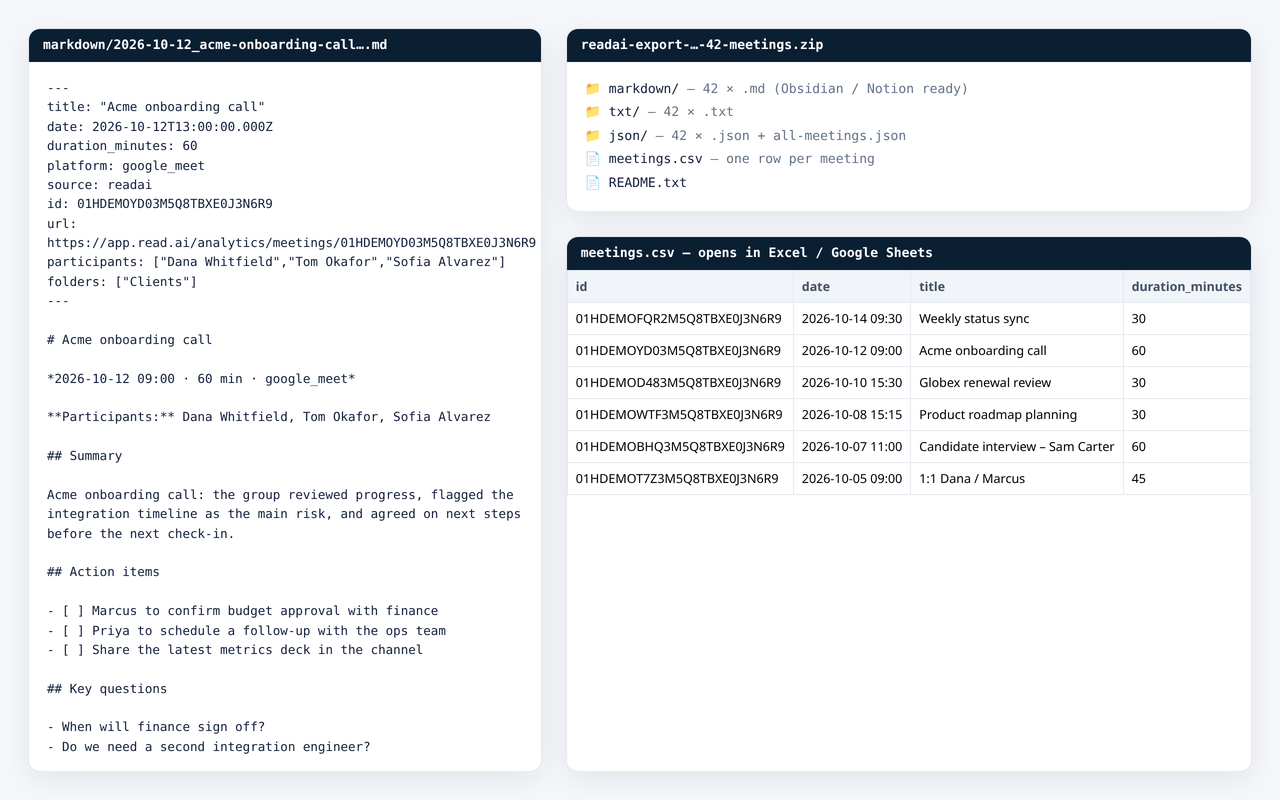
One .md per meeting with front-matter (date, attendees, folder), summary, action-item checkboxes and a timestamped, speaker-labelled transcript.

CSV for Sheets & Excel

One row per meeting: date, title, length, participants, summary, action items, key questions, topics and full transcript.

TXT & JSON

Plain text for anything, and structured JSON for developers, AI tools and archives.

Built for big archives

Follows Read AI’s pagination and 100-requests-per-minute limit, retries automatically, and lists anything it couldn’t fetch in README.txt.

Filters

Date range plus comma-separated keywords across titles, attendees and Read AI folders.

Private by design

No NoteHaul servers, no analytics. Tokens stay in your browser. Privacy policy.

Example exported Markdown file and meetings.csv spreadsheet

Pricing

Try it on real meetings first. Pay once if it saves you time.

Free trial

$0
  • Export up to 5 meetings
  • All formats and options
  • No account, no card

Unlimited

$29
one-time payment
  • Unlimited meetings and exports
  • Future updates for Read AI
  • Secure checkout by Stripe via ExtensionPay
  • 14-day full refund (policy)

FAQ

Can I bulk export all my Read AI transcripts at once?

Read AI’s download button works one meeting at a time and its Zapier integration only captures new meetings. NoteHaul uses Read AI’s official API to export past meetings in bulk into one ZIP.

Which formats are supported?

Markdown (.md), plain text (.txt), CSV (one row per meeting) and JSON. Choose any combination; each format gets its own folder in the ZIP.

What can I include?

Transcript (with optional timestamps and speaker names), summary, action items, key questions, topics and chapter summaries.

Do I need a paid Read AI plan?

Read AI states its API is available on all plans, including Free. If you’re in a Read AI workspace, an admin must have Downloads enabled (Workspace Settings → Reports & Sharing). You can only export meetings you can already see in Read AI.

Does NoteHaul see or store my meetings?

No. The extension runs in your browser and calls Read AI’s API directly. Meeting content is only written to the ZIP on your computer. See the privacy policy.

Read AI’s API is in beta — what if it changes?

Read AI describes its public API as an open beta, so details may change. If something breaks, we’ll update the extension; the free trial lets you confirm it works for your account before paying.

How does payment work?

Checkout is handled by ExtensionPay, with card payments processed by Stripe. NoteHaul never sees your card details. It’s a one-time $29 payment, not a subscription. Your bank statement will show NOTEHAUL.

Can I get a refund?

Yes. You get a full refund within 14 days of purchase. Email britnykaminski11@gmail.com with the email you paid with. Refunds are issued through Stripe, and the unlimited license is revoked afterwards. See the refund policy.

I already paid. How do I unlock on another computer or after reinstalling?

Open NoteHaul, click Already paid? at the top, and enter the email you paid with. ExtensionPay emails you a login link that restores your unlock.

How do I get help?

Email britnykaminski11@gmail.com.

Is NoteHaul made by Read AI?

No. NoteHaul is an independent tool and is not affiliated with or endorsed by Read AI. “Read AI” is a trademark of its owner.